📷 Ultimate Guide to Advanced Camera Control & Virtual Backgrounds
PhenoCapture goes far beyond basic image capture by offering a broadcast-studio-level control center for your connected webcams and digital cameras. Whether you are recording a video presentation, streaming, scanning documents, or simply want to look your absolute best in an online meeting, the Device Property tool gives you absolute command over your hardware.
This module not only unlocks the hidden potential of your camera by overriding default auto-settings, but it also features advanced AI background removal and creative color mapping.
Here is a comprehensive breakdown of everything you can achieve with this powerful tool.
💡 Master Your Video Quality
Most webcams struggle with varying room lighting, often resulting in washed-out faces or dark shadows. PhenoCapture allows you to bypass the camera’s automatic guesswork and manually dial in the perfect picture.
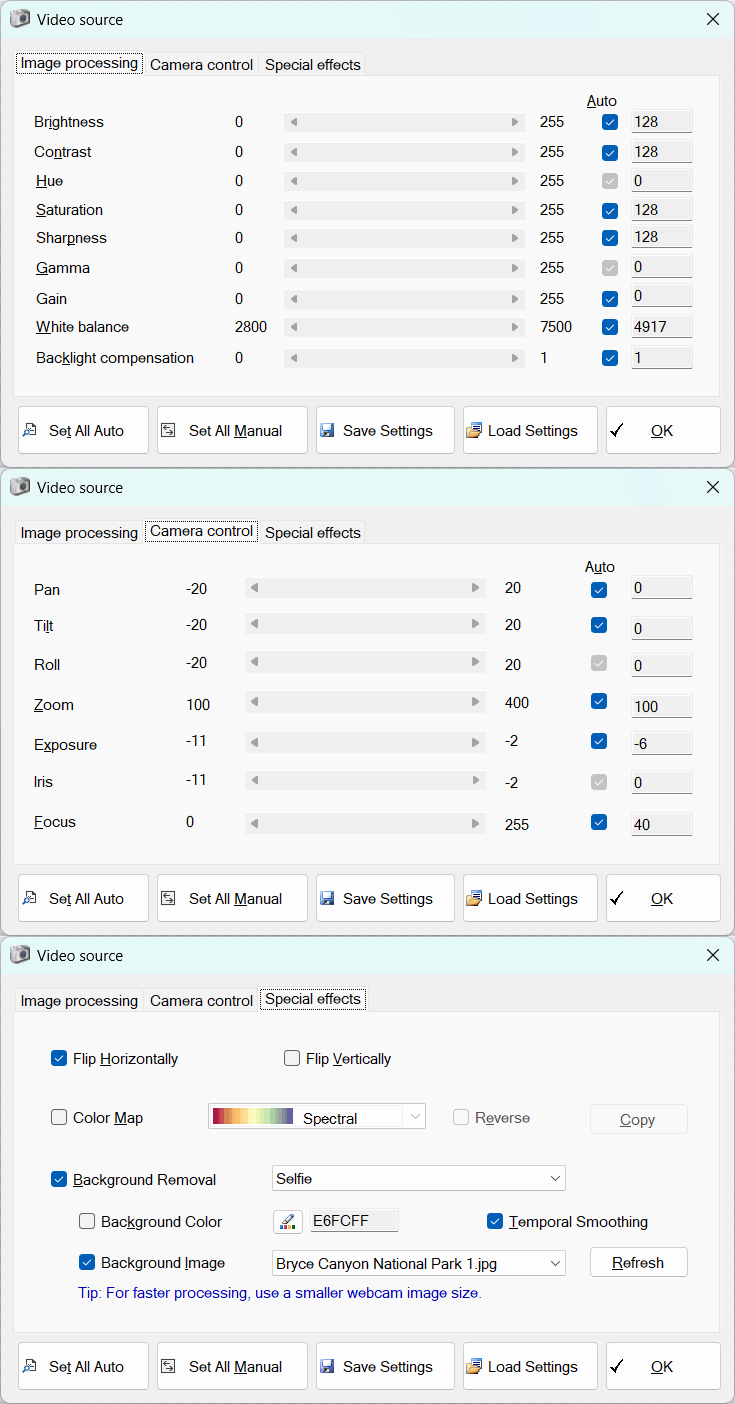
- Brightness, Contrast & Saturation: Fine-tune the basic visual punch of your feed. Easily rescue a flat, dull image by bumping up the contrast and saturation to make colors pop naturally.
- White Balance & Hue: Stop your camera from making you look too orange or too blue. Manually adjust the white balance to perfectly match the real-life lighting in your room (whether it is warm incandescent bulbs or cool LED panels).
- Sharpness & Gamma: Enhance the crispness of your video feed. Increasing sharpness is especially useful when capturing text from documents or highlighting fine details in an object you are presenting.
- Backlight Compensation: Automatically brighten your subject when there is a strong light source (like a window) directly behind them.
- Image Flipping: Instantly flip your video feed horizontally (mirror effect) or vertically to match your preferred orientation.
🎛️ Deep Hardware Controls
Take physical control of your camera lens and sensor. By checking the manual override boxes, you can stop your camera from constantly adjusting itself while you work.
- Manual Exposure & Iris: Auto-exposure often causes frame rate drops and motion blur in low light. By locking your exposure manually, you can guarantee a smooth, professional frame rate.
- Focus Lock: Say goodbye to annoying “autofocus hunting” where the camera blurs in and out when you move your hands. Lock the focus precisely on your face or your subject.
- Pan, Tilt, and Zoom (PTZ): If your camera hardware supports it, you can digitally or mechanically zoom in, and then pan (left/right) or tilt (up/down) to frame your shot perfectly without physically moving the camera on your desk.
(Tip: Use the All Manual button to instantly disable all automatic camera adjustments, giving you a completely stable, unchanging video feed.)
✨ AI-Powered Virtual Backgrounds
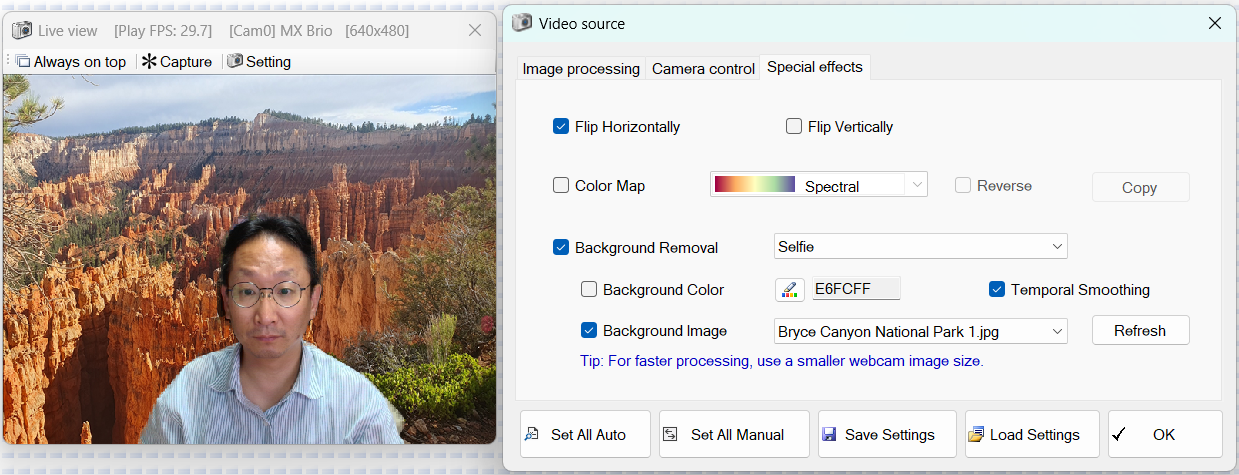
You do not need a physical green screen to have a professional background. PhenoCapture includes a highly optimized AI background removal engine that separates you from your room in real-time.
- Multiple AI Algorithms: Choose the AI model that fits your computer’s performance. Select “Selfie” for fast, lightweight processing, or choose high-resolution “Portrait” modes (up to 512×512) for incredibly sharp, accurate edge detection around hair and clothing.
- Solid Color Replacement: Replace your messy room with a clean, solid color of your choice using the built-in color picker. This is perfect if you want to create a pure white background for corporate headshots or a stark green background for chroma-keying in other software.
- Custom Image Backgrounds: Drop your own images into the “Webcam Background Images” folder and select them from the dropdown menu to instantly transport yourself to a professional office, a cozy studio, or any custom environment.
- Temporal Smoothing: When activated, this smart feature analyzes consecutive frames to prevent your edges from jittering or flickering, ensuring the background cutout looks natural and stable while you move.
🎨 Creative Color Mapping
For highly stylized streams or specialized vision modes, you can apply real-time Color Maps to your live video feed.
- Dynamic Visual Styles: Choose from a wide variety of spectral presets (like thermal-style coloring) from a convenient dropdown menu.
- Reverse Mapping: Instantly invert the color scale of your chosen map with a single click.
- Export the Scale: Need to show your audience what the colors represent? Click the copy button to send a beautiful, high-resolution image of the color scale gradient straight to your clipboard.
💾 Save and Load Your Perfect Studio Profiles
Lighting changes throughout the day, and you might use your camera for different purposes. PhenoCapture saves you from having to remember and readjust your settings every single time.
- Export to CSV: Once your focus, exposure, color balance, and virtual background are perfectly dialed in, save the entire configuration as a lightweight profile file.
- One-Click Reloading: Create different profiles like “Morning Sunlight,” “Night Stream,” or “Document Scanning.” Load the appropriate profile, and PhenoCapture will instantly send all the complex commands to your camera hardware and AI engine to recreate your exact setup.
With PhenoCapture’s advanced device properties, you have a complete digital studio at your fingertips. Take control of your hardware, eliminate background distractions, and ensure you always capture the highest quality video possible!