✨ A Complete Guide to High-Quality Sharpening
PhenoCapture AI’s High-Quality Sharpening (5×5) is the ultimate tool for rescuing soft, slightly out-of-focus, or blurry images. Whether you want to recover lost details in a landscape photo, make the text on a scanned document perfectly crisp, or give an everyday portrait a professional pop, this advanced sharpening filter handles it effortlessly.
Unlike basic sharpeners that often add harsh noise, this tool uses a sophisticated 5×5 matrix to intelligently enhance edges while keeping the rest of your image smooth.
💡 Key Features
- Advanced 5×5 Matrix Processing: By analyzing a wider area around every single pixel, this tool provides a much higher quality, more natural-looking sharpness compared to standard filters, avoiding unwanted grain or harsh pixelation.
- Smart Zoom-Aware Preview: The real-time preview intelligently adapts to your exact zoom level. Whether you are zoomed all the way out or checking tiny details up close, the preview ensures you see an accurate representation of the final result.
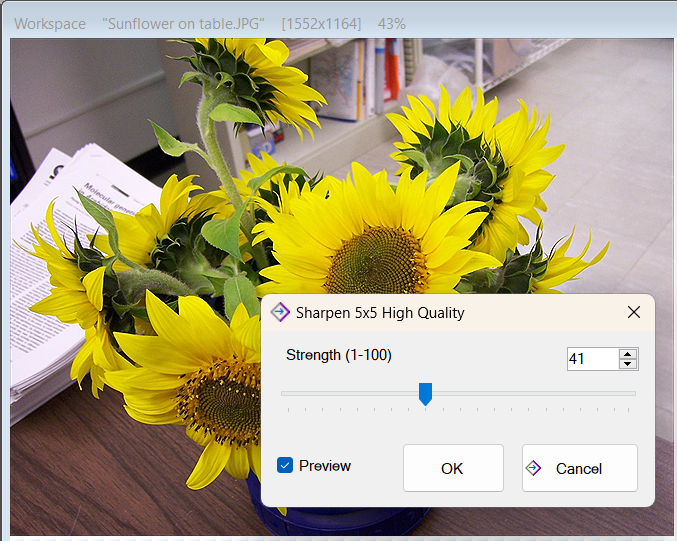
- Precise Strength Control: You have complete control over the intensity of the effect. From a very subtle enhancement to a dramatic, ultra-crisp finish, the strength slider lets you dial in the exact look you need.
- Zero-Lag Rendering: Built with extreme optimization, you can drag the slider and instantly see the sharpness change on your image without any annoying loading times or freezing.
🛠️ How to Use High-Quality Sharpening
Bringing your blurry photos back into focus is incredibly easy. Just follow these simple steps:
Step 1: Enable the Preview
Open the High-Quality Sharpening tool. Make sure the Preview checkbox is enabled so you can watch your image transform in real time as you adjust the settings.
Step 2: Adjust the Strength Slider
Grab the Strength slider and slowly move it to the right.
- Use a lower value for a gentle touch-up on photos that are only slightly soft.
- Use a higher value to aggressively bring out details in blurry shots or to make text highly readable.
Step 3: Check the Details
Because the tool is fully zoom-aware, you can freely zoom in and pan around your workspace while the preview is active. Check the edges of your subject to ensure the sharpness looks crisp and natural.
Step 4: Apply the Final Result
Once you are happy with the level of detail and clarity, simply click OK. The high-quality sharpening will be instantly and permanently applied to your image!
(Tip: If you change your mind, you can always click the Cancel button to leave your original image completely untouched.)
With the High-Quality Sharpening tool, giving your soft photos a professional, crystal-clear finish is faster and easier than ever!