📑 A Complete Guide to Hangul (HWP & HWPX) File Preview & Import
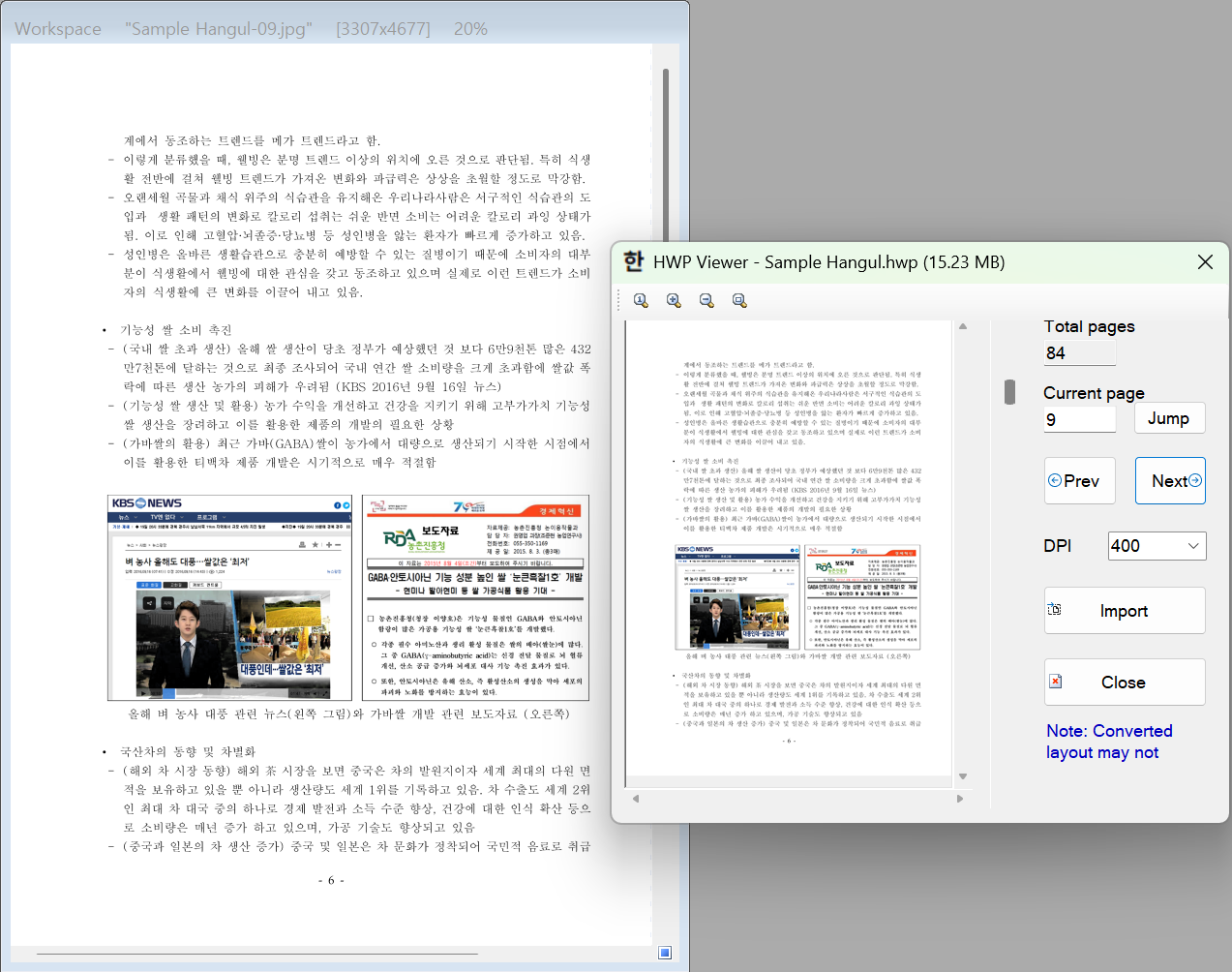
PhenoCapture AI’s HWP Preview is a dedicated document-to-image extraction tool that allows you to directly open, inspect, and import high-resolution pages from Korean Hangul Word Processor documents (.hwp and .hwpx). PhenoCapture AI accurately reproduces multi-column layouts, intricate scientific tables, mathematical equations, embedded figures, and Korean typography. You don’t need to take low-resolution screen captures or even have Hancom Office installed on your PC—simply drag your Hangul document into PhenoCapture AI, preview the exact page you need, and import it straight into your workspace.
Here is everything you need to know to extract crisp, publication-ready graphics from your HWP and HWPX files.
💡 Key Features
- Native HWP & HWPX Support: Seamlessly load both binary .hwp (HWP 5.0) and XML-based .hwpx (OWPML) documents directly into the viewer without requiring Hancom Office or any external viewer software—even on English or international Windows 10/11 systems.
- Instant On-Demand Page Rendering: Instead of making you wait to convert hundreds of pages at once, the viewer rapidly counts the total pages and renders only the single page you are currently viewing. Previously viewed pages are automatically cached for instantaneous 0-ms navigation, and a built-in Abort button lets you cancel heavy operations at any time.
- Adjustable DPI & Publication Quality (50 to 600 DPI): Keep navigation snappy with a capped 150 DPI live preview while selecting up to 600 DPI for your final import—ensuring razor-sharp text, tables, and vector diagrams for academic manuscripts, posters, or OCR analysis.
- Smart Oversized Image Protection: If an ultra-high-DPI page exceeds the maximum allowed workspace dimensions, PhenoCapture AI automatically calculates the optimal aspect-ratio-preserving resolution and offers one-click high-quality bicubic downscaling.
- Seamless Workspace Extraction: Transfer any rendered page into your main PhenoCapture AI canvas with a single click on Import, or simply drag and drop the page straight from the preview viewer onto your workspace.
🛠️ How to Use HWP Preview
Extracting high-resolution pages from a Hangul document takes just a few effortless steps:
Step 1: Open Your Hangul Document
Simply drag and drop a .hwp or .hwpx file directly onto the PhenoCapture AI workspace, or select File > Import > Import Image from Hangul (HWP/HWPX) File from the main menu. The software will automatically count the document pages and open the HWP Viewer window with Page 1 ready to view.
Step 2: Navigate to Your Target Page
Once your document is open:
- Use the Prev / Next buttons, drag the Page Scrollbar, or type a page number and click Jump to move to the exact page you want to extract.
- Use the top toolbar icons (Zoom 100%, Zoom In, Zoom Out, and Fit to Screen) or your mouse wheel to inspect fine typography and table borders.
Step 3: Select Your Import Quality (DPI)
Click the DPI dropdown menu on the right panel to choose your desired output resolution:
- 50 – 150 DPI: Ideal for quick layout checks, lightweight web sharing, or fast drafts.
- 200 – 300 DPI: The recommended standard for general image editing, presentations, and smart AI OCR text extraction.
- 400 – 600 DPI: Ultra-high resolution for scientific publication figures, fine print, and deep zoom inspection.
Step 4: Import the Page
When you have found the right page and set your target DPI, you have two convenient ways to send it to your main workspace:
- Click the Import button to render the page at your selected DPI and load it directly into the PhenoCapture AI canvas.
- Or, simply Click and Drag the page image from the preview canvas and drop it straight onto your main PhenoCapture AI workspace!
🙏 Special Thanks & Acknowledgment
We would like to express our sincere gratitude to Edward Kim and Contributors for developing and releasing the open-source rhwp Rust rendering engine under the MIT License. By integrating rhwp, PhenoCapture AI delivers fast, standalone HWP and HWPX page rendering without external software dependencies.
Note: Hangul document (.hwp, .hwpx) support is implemented by referencing the public HWP and OWPML document file specifications published by Hancom Inc.
With the HWP Preview tool, converting Korean academic papers, government reports, and technical forms into high-resolution, editable images is faster and easier than ever!