📍 A Complete Guide to the Point Location Recorder
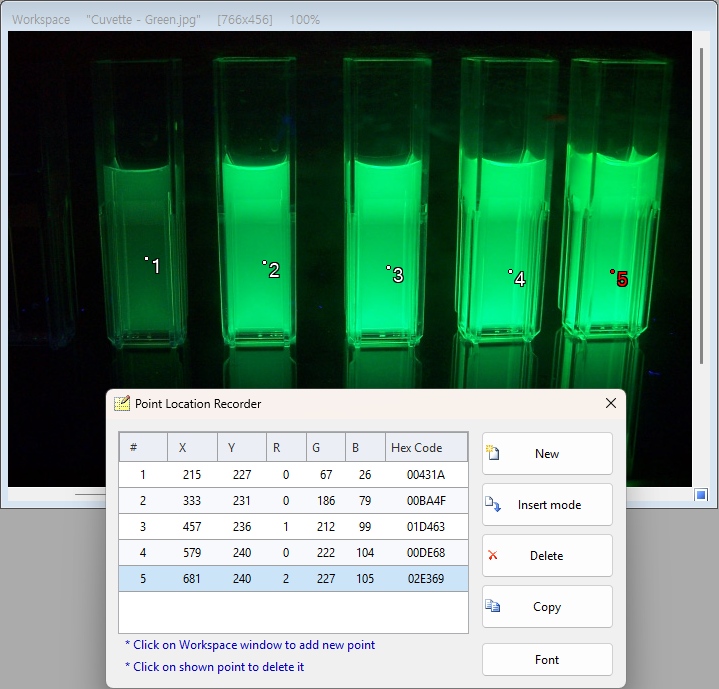
PhenoCapture AI’s Point Location Recorder is a highly efficient tool designed for extracting precise X and Y coordinates directly from your images. Whether you are mapping out particle distributions, tracking movement paths, or logging specific anatomical landmarks in a scientific scan, this tool instantly translates visual locations into organized numerical data.
Here is everything you need to know to accurately record and export coordinate data from your images.
💡 Key Features
- Interactive Point Placement: Simply click anywhere on your image, and the software will immediately record the exact X, Y pixel coordinates and drop a numbered visual marker on the screen.
- Smart Visual Feedback: The tool draws crisp, clear targets (white dots with black outlines) for every point. The currently selected point in your list turns bright red, so you never lose track of which coordinate you are analyzing.
- Dynamic Editing (Insert & Delete): Made a mistake? No problem! You can easily delete an incorrect point by clicking on it again, or use the Insert Mode to squeeze a new coordinate exactly where you want it in the middle of your existing list.
- Instant Excel Export: Once you have mapped out all your points, a single click copies the beautifully tabulated list of X and Y coordinates to your clipboard, ready to be pasted directly into Excel or any data analysis software.
🛠️ How to Use the Point Location Recorder
Extracting precise coordinate data takes just a few intuitive clicks. Follow these simple steps:
Step 1: Start Recording
When you open the Point Location Recorder tool, your cursor will automatically turn into a precise crosshair, indicating that the tool is ready.
Step 2: Add Your Points
Click on any target area in your main workspace image.
- Every time you click, a new numbered marker will appear on the image.
- The exact X and Y coordinates will instantly appear in the list on the tool panel.
Step 3: Edit Your List (Optional)
If you need to make adjustments to your recorded points:
- To Delete: Either select the point in the list and click Delete, or simply click directly on the existing point on the image.
- To Insert: Select a specific point in the list, click the Insert button to turn on Insert Mode, and click on the image. The new point will be added directly into that spot in the sequence!
- To Clear: Click Clear to instantly wipe the board and start fresh.
Step 4: Export Your Data
Once all your points are perfectly placed, click the Copy to Clipboard button. The software will instantly format your coordinate list (Point Number, X, and Y). You can now open Excel or Notepad and simply hit Paste!
With the Point Location Recorder, translating visual image markers into structured mathematical data is incredibly fast, accurate, and completely effortless!