⭕ A Complete Guide to Hough Circle Detection
PhenoCapture AI’s Hough Circle Detection is a specialized, highly accurate tool designed to find perfect circles hidden within your images. Whether you are counting round cells under a microscope, inspecting manufactured mechanical parts, or locating circular objects like droplets or coins, this advanced mathematical feature pinpoints them flawlessly.
Please note that this tool automatically performs a high-speed internal binarization, meaning you can apply it directly to both color and binary images!
Here is everything you need to know to automate the tedious task of finding and identifying circular objects.
💡 Key Features
- Automatic Binarization & Color Support: While optimized for analyzing binary shapes, the tool features a high-speed internal auto-binarization engine, allowing you to seamlessly process full-color images directly.
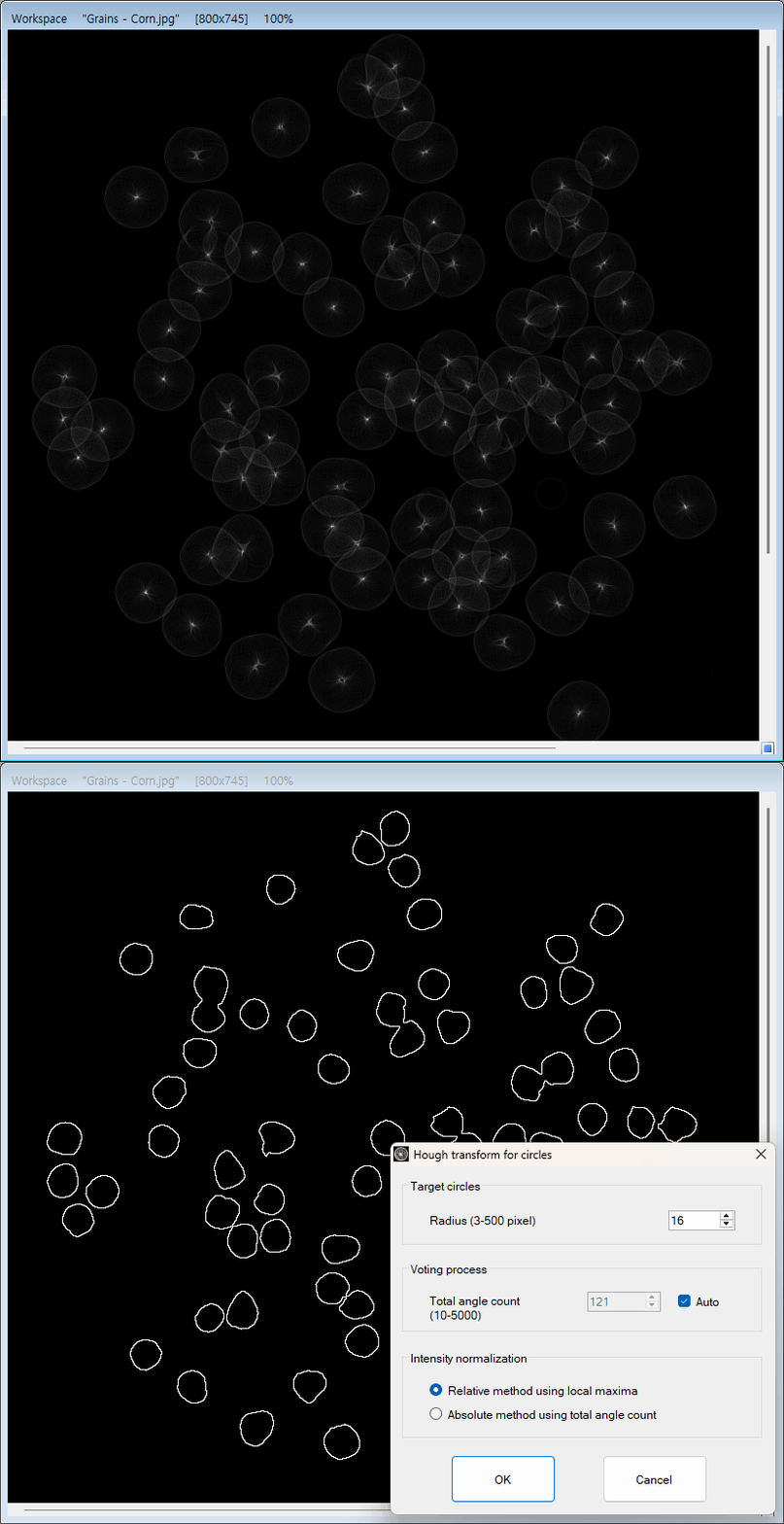
- Pinpoint Radius Control: Tell the software exactly what size to look for. By setting a specific radius, the tool intelligently ignores irregularly shaped objects or circles of the wrong size, focusing only on what matters to you.
- Smart Auto-Calculation: You don’t need to be a math expert to use this advanced algorithm. The tool can automatically calculate the optimal angle steps (Total Angle Count) based on your chosen radius to guarantee the most accurate detection.
- Flexible Normalization: Fine-tune how the algorithm scores and highlights the detected circles. The Absolute Normalization toggle helps adapt the detection to images with varying lighting, contrast, or background noise.
🛠️ How to Use Hough Circle Detection
Detecting perfect circles is highly intuitive. Just follow these simple steps:
Step 1: Prepare Your Image
Ensure your image is loaded into the main workspace. Because the tool automatically runs an internal binarization algorithm, you can use either a color image or a pre-processed binary image. However, for the most accurate and reliable circle detection, we highly recommend perfectly isolating your objects beforehand using our dedicated high-performance binarization tools: Manual Binarization, Adaptive Binarization, Binarization and Segmentation, or Custom Binarization.
Step 2: Set the Target Radius
Use the Radius number box to specify the exact size (in pixels) of the circles you are trying to find. The tool is highly versatile, supporting everything from tiny microscopic dots (as small as 3 pixels) to massive rings (up to 500 pixels).
Step 3: Automate the Math (Recommended)
For the best and most reliable results, keep the Auto checkbox enabled next to the Total Angle Count. The software will instantly adjust the detection sensitivity to perfectly match your selected radius. (If you are an advanced user testing specific algorithm thresholds, you can uncheck the Auto box and enter a custom angle count between 10 and 5000).
Step 4: Choose Your Normalization Mode
Toggle the Absolute Norm option based on your image’s contrast. Checking this box applies a strict, absolute scoring method to the detected shapes, which can drastically improve accuracy when your image has a lot of distracting background textures.
Step 5: Run the Detection
Once your radius is set, simply click OK. The software will instantly scan your entire image and locate every single circle that matches your exact criteria!
(Tip: If the software finds too many or too few circles, simply undo the action, adjust the Radius slightly, and try again!)
With the Hough Circle Detection tool, discovering, analyzing, and counting perfectly round objects in your images is faster and more precise than ever!